
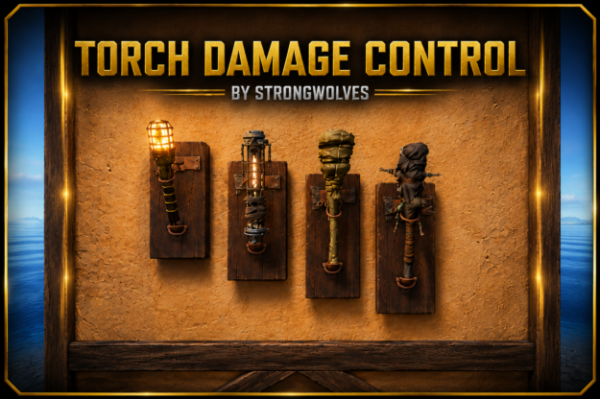
Torch Damage Control

6,00 €
Sold by: the_jokerNo more endless runs back to base for fresh torches! TorchDamageControl is a simple, lightweight plugin that gives players and admins full control over how fast (or whether at all) torches and other light sources lose durability on your server.
- Description
- Reviews (0)
- Change Log
- Discussions (0)
- Product Enquiry
Description
About Torch Damage Control
No more endless runs back to base for fresh torches! TorchDamageControl is a simple, lightweight plugin that gives players and admins full control over how fast (or whether at all) torches and other light sources lose durability on your server.
Why TorchDamageControl?
◆ Endless light, no cheats – Torches, lanterns and other light sources stop losing durability. Players can focus on the game instead of constantly crafting new ones.
◆ Three modes to match your server style – Disable durability loss globally for everyone, restrict it to players with a specific permission, or handle it per item owner.
◆ Item whitelist – The plugin only watches what you tell it to.

Three Protection Modes
Global mode (default) – Durability loss disabled completely for every player. Simplest setup, ideal for PvE / casual servers. →
"Disable durability loss globally": true
Permission mode – Global disabled, the plugin only reacts to players with a permission from one of the groups. No permission = normal durability loss. Great as a donator reward. →
"Disable durability loss globally": false, "Require permission": true
Owner mode – Global and Require permission both disabled. The plugin finds the owner of each item and applies their permission multiplier. If the item has no owner or the player has no group, the item degrades normally. Good for servers where each player should have their own “tier” independent of others. →
"Disable durability loss globally": false, "Require permission": false
Commands
◆ /tdc or /tdc status – Shows whether protection is enabled, which mode is active and how many items the plugin is watching. (requires permission torchdamagecontrol.admin)
◆ /tdc reload – Reloads the config and lang file without restarting the server. (requires permission torchdamagecontrol.admin)
Permissions
◆ torchdamagecontrol.admin – Access to the /tdc command (status / reload). Give it to admins.
◆ torchdamagecontrol.default – Default group, multiplier 1.0 (full durability loss). Mostly serves as a fallback.
◆ torchdamagecontrol.vip – Multiplier 0.5 (half durability loss). For VIP players.
◆ torchdamagecontrol.elite – Multiplier 0.0 (no durability loss). For top tier / donators.
You can define your own groups in the config — just add a line with the permission name and a multiplier (0.0 = never wears out, 1.0 = normal rate). The plugin registers them automatically on startup.
Config
{
  "Disable durability loss globally": true,
  "Require permission (only used when global disable is OFF)": false,
  "Permission groups (lowest multiplier wins, 0 = no loss at all)": {
    "torchdamagecontrol.default": 1.0,
    "torchdamagecontrol.vip": 0.5,
    "torchdamagecontrol.elite": 0.0
  },
  "Item shortnames the plugin should watch": [
    "torch",
    "divertorch",
    "torch.torch.skull",
    "industrial.torch"
  ],
  "Print a debug line whenever protection kicks in": false
}
Quick mode table
Disable globally	Require permission	  Result
true	                (any)	                  Global – protected for everyone
false	                true	                  Permission – protected only for players with a permission
false	                false	                  Owner – protected based on the item's owner
FAQ
Q: Does it work with lanterns and fire pits too? A: Yes. The plugin watches any item whose shortname is listed in the config under Items. The defaults are torch, divertorch, torch.torch.skull, industrial.torch.
Q: A player has multiple group permissions — which one wins? A: Always the one with the lowest multiplier. If a player has both vip (0.5) and elite (0.0), 0.0 applies → the torch never wears out.
Q: Can I keep durability loss for normal players and only disable it for VIPs? A: Yes. Set “Disable durability loss globally”: false and “Require permission”: true. The plugin will then only affect players that belong to one of the groups in Groups.
Q: How does Owner mode differ from Permission mode? A: In Permission mode the plugin reacts to any player who has a permission, no matter which item they’re holding. In Owner mode the plugin first looks up the item’s owner (playerOwner) and only then checks their permission — so a torch you own (VIP) will be protected even if someone else is currently holding it in their inventory.
Q: How do I add a custom VIP tier? A: Add a line like “torchdamagecontrol.legend”: 0.25 to Permission groups in the config and run /tdc reload. The plugin registers the permission automatically and from that point on you can assign it via oxide.grant.
Q: How do I change the message texts? A: Edit oxide/lang/en/TorchDamageControl.json. You’ll find the texts for the /tdc chat command there (NoPerm, Reloaded, On, Off, Status).
Q: Something’s not working — how do I debug it? A: Set “Print a debug line whenever protection kicks in”: true in the config. The plugin will start logging every blocked durability tick to the console along with the item shortname and the owner’s SteamID.
Only logged in customers who have purchased this product may leave a review.
Discussions
There are no discussions yet.













Reviews
There are no reviews yet.